![MT White Logo _ PNG-01.png]](https://help.medicaltracker.co.uk/hs-fs/hubfs/MT%20White%20Logo%20_%20PNG-01.png?height=31&name=MT%20White%20Logo%20_%20PNG-01.png)
How will I know if a parent or carer has requested amends to a student's care plan?
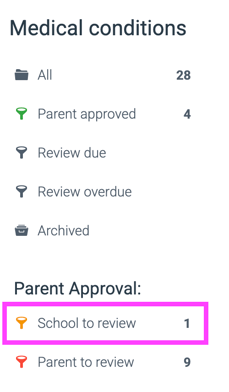
When a parent or carer has requested amends to a care plan via the Parent Approve app, the care plan will appear in the School to review filter on the Medical conditions module. Simply click to see the filter to see the care plans in this category.
Where can I see the specific amends they have requested?
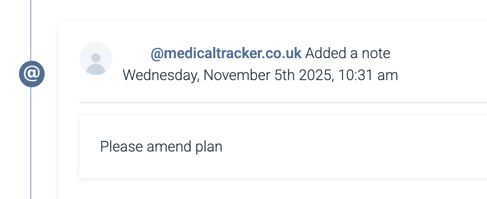
Select the care plan and scroll to the bottom of the page where you can see the communication history. Then select the External notes tab.

Any comments left by the parent will be recorded here, along with their email address and the timestamp of when they made the request.
How can I make the required edits to the plan?
Scroll back up to the top of the page and click Edit. This will reopen the care plan for editing. Remember to save any changes you make.
How can the parent or carer access the amended care plan to approve it?
Once you've made the changes and clicked Save you will need to re-enable parent approval so the parent or carer can review the revised care plan and approve it.
Alternatively, if you are meeting the parent or carer face-to-face they can approve the plan in-person by signing using the trackpad or a touchscreen. To access this option, head to Send notification > In-person.