![MT White Logo _ PNG-01.png]](https://help.medicaltracker.co.uk/hs-fs/hubfs/MT%20White%20Logo%20_%20PNG-01.png?height=31&name=MT%20White%20Logo%20_%20PNG-01.png)
After creating an incident, some fields can no longer be modified. This includes the name of the student or staff member. In addition, it is not possible to change an incident from one type to another, for example from an injury to bump and scrape.
In these circumstances you will need to delete the incident. This will completely remove it from the database.
To delete an incident, you must either be a super user or belong to a team with the Delete incident permission enabled. If you do not see the option to delete a record, it's likely you do not have the appropriate permission level.
How to delete an incident
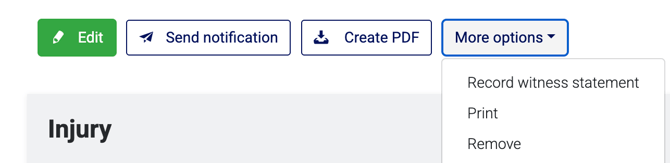
Head to the incident's summary page, and click More options > Remove.