![MT White Logo _ PNG-01.png]](https://help.medicaltracker.co.uk/hs-fs/hubfs/MT%20White%20Logo%20_%20PNG-01.png?height=31&name=MT%20White%20Logo%20_%20PNG-01.png)
Our trust reporting works with existing permissions; users only see the school(s) they're linked to, and can only view incident details and export CSVs if they have the appropriate permissions. As ever, super users can do everything.
Most of the issues likely to arise with this feature are to do with the logged-in user's permissions and/or their access to schools in the trust.
Super users and admins on your account can can troubleshoot any user's access by heading to Settings > Users and Teams.
Why can't I see the Reports link on the left hand side?
You need to be in a team with permission to view reports before you can click through. Trust-level users with admin permissions can change your permission(s) as needed.
Why is the default date range the last 7 days?
We've simply picked the last 7 days' worth of data as a starting point. We would love to hear any feedback on what a more useful default date range would be—just drop us an email at support@medicaltracker.co.uk to let us know.
For now, you can change your date range filters on a single report and it will be remembered for the rest of your session.
Why is the data not live? I can only see incidents up to yesterday.
In building these reports we've prioritised delivering fast, responsive reports that perform well when dealing with an entire school year's worth of data across multiple schools. Data is aggregated nightly, and available the following day, which means you can only see data up to and including yesterday.
If you need to see today's data, just use the multi-school switcher on the trust overview to navigate to any school and see the live view.
Why can I only see data from some schools in my organisation?
You need to be added to every school which you want to see the data for. Trust-level users with admin permissions can change which school(s) you have access to as needed.
The location category report is showing most of the incidents in the 'other' category, but when I click through to the school level I can see that a location is set.
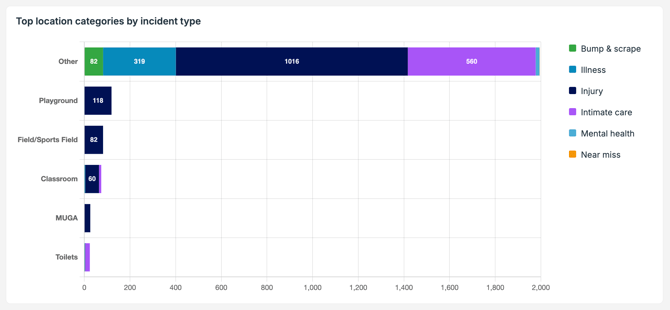
At time of writing (July 2026) the chart only displays the top 5 location categories for incidents, with the rest grouped under 'Other'. We plan to show all of your trust's location categories in this chart in the coming weeks.
Location categories are set at the trust level, and locations are set on a per-school basis. When you drill down to school level, you're seeing the name of the school's location. Learn more here.
I can't see an export button. Where is it?
You need to have permission to download CSV exports before the button is visible. Trust-level users with admin permissions can change which school(s) you have access to as needed.
Why can't I export the charts?
We're looking at ways to do this in the future. For now you can take a screenshot of the charts, or download the CSV data to rebuild the charts in your platform of choice.
Why can't I click through to view incidents at a school?
You need to be in a team with permission to view incident data before you can click through. Trust-level users with admin permissions can change your permission(s) as needed.
I was expecting to see a particular incident at a school but I can't see if anywhere.
This is likely to be down to your team's permissions. There are separate permissions to view staff and student records, and to view confidential records for staff and students.
Trust-level users with admin permissions can change your permission(s) as needed. If that doesn't fix the problem, please contact us at support@medicaltracker.co.uk
Why can't I view audit logs for an incident?
Only super users can view audit logs for incidents. Another super user at your trust can change your permission(s) as needed.
I want to see data on [this thing] but you don't have it yet.
If you have an idea for a report you'd like to see, you can make a suggestion via our Feature Request form.
We're particularly interested in learning what data around medication stock and medication use is most important to users at the trust level.